
Python Functions Explained Simply - A Beginner's Guide
Hello, World! This article is a guide for beginners to understand functions, an essential concept in programming that enhances code efficiency and reusability. I have explained functions as clearly as I could, with relatable analogies and some mini-projects to help you understand the concepts explained better. If you have any questions, feel free to post your questions in the comments, and make sure to solve the exercises given in the end to test your knowledge! And if you have subscribed to my newsletter - do check your inbox to confirm your email so that you receive updates and become a subscribed user!
Before reading this guide, make sure that you have a basic understanding of Python syntax, and are able to understand variables assignment, how to print statements on the terminal, as well as conditionals and string methods (do let me know in the comments if you want me to write a guide on these topics!).
What are Functions?
► Functions = verbs in Python that do a specific task
► Functions use two things to be useful: parameters and arguments
► Parameters are placeholders for input. A function uses parameters to accomplish its task, but there are functions in Python that exist without input (will be explained later).
►Arguments are the actual input we are using while calling the function. This “actual input” passed to the function makes the function more useful to the programmer.
To begin with, functions are like machines. They take in some input to produce some output that will be useful to us when we write programs. So, just to make it easier for you to understand what functions are, let’s start with a simple analogy.
Imagine you have a printer at home – a printer you bought so that you could get hard copies of the documents or images stored in your device. Let us think of the printer as a function.
So, for a printer to work, you need to insert paper in a slot first. So, the slot can be called a parameter – it is a placeholder for the paper, which is an argument to the printer function.
The second input a printer requires is an image or document we want to print. So let us assume that within the printer’s hardware is a placeholder, or rather, a parameter, that will take the image or document we want to print on paper as an argument. Then, once the printer processes the inputs, it produces the output – a hard copy of the image or document we gave as input.
So, to sum up the analogy:
Parameters = slot for placing paper in a printer, space in the printer’s hardware for storing user input (an image or a document)
Arguments = paper in the slot, image or document stored in the placeholder in the printer’s hardware
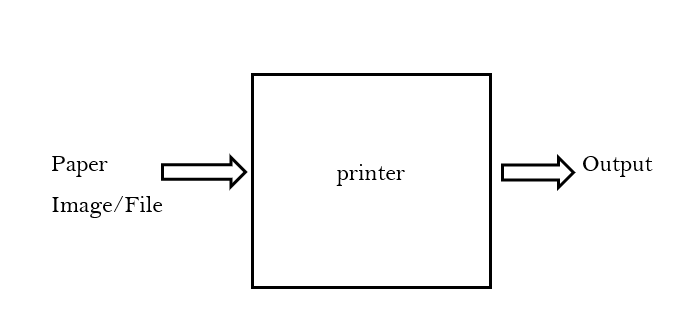
Just to clarify, a printer is not a function in reality. Just to make clear what exactly a function is, we assumed that the printer is a function.
Quick overview:
Parameters vs. Arguments:
► Parameters are placeholders for actual values in Python, and normally used while defining functions. For example, the print function has a parameter named end which is used to override the use of newlines, which is the default argument for the end parameter in Python.
► Arguments are the actual values which are passed to the function when the function is called or used in specific parts of the program. For example, print(“Hello, friend!”) takes in “Hello, friend!” as its argument.
Understanding and Writing Functions
► We use functions a lot when we write code in Python – print() being an example.
► We can also write functions of our own that accomplish a task in our program, using the keyword def, short for define.
So let us start by understanding how useful functions are when we write code.
For example, suppose we want to write a program that prints “Hello, World” in the terminal of our IDE (Integrated Development Environment). This can be done by writing:
print("Hello, World")
So the above is the most commonly used function in Python. print() takes in text as input, and produces the output on the terminal.
In Python, we specify the inputs that a function is supposed to take as arguments or parameters is defined within a set of brackets. There are functions that exists without any parameters as well, which will be explained in a moment.
To define a function in Python, follow the steps:
▶ Start by writing def
▶ Name your function, for example, greet
▶ Specify the inputs your functions should take (or leave the brackets empty if the functions takes in no input)
▶ Type a colon and press enter
▶ Write code within the indented block (this will be your function definition)
Example:
def add_two_ints(a, b):
    total = a + b
    print(total)
In the above code, we have defined a function called add_two_ints, which takes in two integers as parameters, a and b. Then we are adding a and b inside the function and storing the sum in a variable, total, and then printing it out.
There are also built-in functions in Python - functions that are already made by other programmers - to make it easier for users to write Python programs. Some examples of built-in functions are print(), input(), etc.
Now coming to the concept of functions without any parameters. These functions do not take any parameters into consideration, hence while defining such functions, the brackets are left empty - we will not be listing any parameters within those set of brackets, as follows:
def world():
    print("Hello, World")
In the above code, we have not defined any parameters for world() within the set of brackets. The function’s job is to just print “Hello, World” on the terminal, so it does not take any parameters.
Quick overview:
Calling a Function vs. Defining a Function
► Calling a function means to use a function in a specific part of a program after defining it elsewhere, while defining a function means writing the code according to the task that the function is supposed to carry out after specifying its parameters and what the function is called. For example:
def greet(name):
    if name == "":
        print("Hello, World")
    else:
        print(f"Hello, {name}")

name = input("Name: ")
greet(name)
In the above code, we have defined a function named greet() with the help of the def keyword, and have specified within the brackets that it is supposed to take name as its parameter. Then, within the indented block, we have written a conditional block that states if name does not hold any value, it should print “Hello, World”, else it should greet the user with their name. Then at the end of the program we are asking the user to enter their name, and then we are calling the function with the value of the name (user input will be assigned to the name variable).
So the code block under def greet(name): is the function definition, while the greet(name) is written to call greet() and use it to greet the user.
Functions Defined by Users vs. Built-In Functions
▶ Functions defined by users are functions that are defined while users are writing their programs, namely functions defined with the help of the def keyword, such as the greet function given as an example.
▶ Built-in functions are functions that are built into a programming language, namely by the creators of that language. Examples include: print(), input(), int(), etc.
What are Return Values and Side-Effects?
There are two outputs of a function in Python:
▶ Return values are the values returned by a function and those values can be used elsewhere in the program when the function is called.
▶ Side-effects are anything that we do outside the program, such as printing on a terminal, modifying a database, etc. One example is the world function given as an example earlier, that prints a message on the terminal.
Consider the following analogy:
Mia is hungry, and since her parents are not at home, she orders a pizza from a takeaway restaurant nearby. One of the delivery boys of that restaurant is asked to deliver Mia’s pizza at her house. Let us take the delivery boy as a function.
So the delivery boy takes Mia’s order as his input and does the process required to achieve the output (taking Mia’s packaged pizza to his scooter, wearing a helmet, finding Mia’s house location on a map, etc.) and then gives Mia her pizza at her doorstep.
To sum up the analogy:
▶ Caller/ Receiver of the Return Value: Mia
▶ Function producing the return value: The delivery boy
▶ Return Value: Pizza
Recall the printer analogy explained in the beginning. The printed paper can be called a return-like output, as it is returning something to the caller (user of the printer).
Quick overview:
Side-effects vs. Return Values
► Side effects always happen outside the program, meaning that some code does work that happens in the real world (terminal, database, etc. ). Example:
def greeting():
    print("Good morning!")
► Return values are values returned by a function to the caller inside the program. For example:
def calc_even(a):
     if a % 2 == 0:
        return True
     else:
        return False

x = int(input("Number: ")
print(calc_even(x))
1. Check for a Prime Number
A function called is_prime() can be implemented to see if the user's number is prime.
# Define a function to check for prime number
def is_prime(n):
    if n % 2 != 0:
        return True
    else:
        return False

# Prompt user for a number
number = int(input("Enter a number: "))

#
if is_prime(number):
    print(f"{number} is a prime number")
else:
    print(f"{number} is not a prime number")
2. Uppercase and Lowercase
Let's write two functions that turn a user's input uppercase or lowercase based on their preference.
def convert_uppercase(word):
    return word.upper()

def convert_lowercase(word):
    return word.lower()

user_input = input("Word: ")
preference = input("Uppercase or Lowercase? ")

if preference == "Uppercase":
    print(convert_uppercase(user_input))
else:
    print(convert_lowercase(user_input))
3. Calculator
- Let's write a function for each mathematical operation and use those functions according to the operator chosen by the user.
# Define a function for addition
def add(x, y):
    return x + y
# Define a function for subtraction
def subtract(x, y):
    return x - y
# Define a function for multiplication
def multiply(x, y):
    return x * y
# Define a function for division
def divide(x, y):
    return x / y

# Prompt user for two numbers and the mathematical operator
m = int(input("Enter a number: "))
n = int(input("Enter another number: "))
operator = input("Enter an operator: ")

# Call a function depending on the user's operator
if operator == '+':
    print(f"Answer: {add(m, n)}")
elif operator == '-':
    print(f"Answer: {subtract(m, n)}")
elif operator == '*':
    print(f"Answer: {multiply(m, n)}")
elif operator == '/':
    print(f"Answer: {divide(m, n)}")
Exercises
- Write a function in Python that calculates the circumference of a circle, rounded to one decimal place.
Radius: 30
Output: 4.8
- Write a function in Python that calculates the area of a rectangle.
Length: 3
Width: 4
Area: 12
- Write a function that calculates the area of a square.
Side: 4
Area: 16


