
To-Do List Manager 101: A Previous Challenge

Hello, coders! In the Lists and Dictionaries article previously, I had given you all the task of creating a To-Do List Manager. So let us have a quick overview of the topics you need to have a robust understanding of in order to do this challenge.
Exceptions
Exceptions are errors that can occur during runtime of a program, and programmers have the ability to avoid certain exceptions in a neater and smoother way, so that user experience is enhanced.
For example, take a look at the code below:
try:
    number = int(input("What's x? "))
    print(number)
except ValueError:
    print("You can only enter integers as input.")
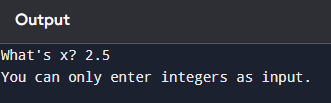
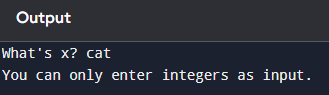
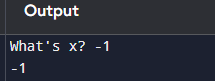
ValueErrors are triggered when a different data type that what the program expects is given as input. In the above code, if the user enters a string (text, such as “hello”, “cat”) or floats (decimals, such as 2.5 or 5.5), the program will display a ValueError if we do not escape the error by using a try…except… block. But in the above code, if the user does enter a string or float, the program will not display a ValueError; instead it will print “You can only enter integers as input.”
Foreseeing errors and avoiding them using a try…except… block is better than letting the user see error messages because the message we display will be way more user-friendly than Python’s hard-to-understand messages.
Infinite loops
Loops are structures that allows us to repeatedly run a block of code a specified number of times.
There are two primary types of loops in Python: a for loop and a while loop.
Take a look at the two examples below:
i = 0
while i < 3:
    print("woof!")
    i += 1
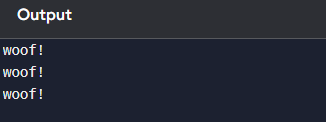
In the above code, we are initializing i to 0 outside the loop, and incrementing it inside the loop, so that it doesn’t get stuck in an infinite loop. The loop starts from 0 and stops at 2 (inclusive). The ending point, 3 in this case, of a loop is always exclusive, meaning that it is not taken into account while looping.
for i in range(3):
    print("woof!")
For loops are shorter to write and easier to read as a result. We don’t need to initialize i outside the loop; the initializing and number of times of iteration is done in a single line, and within the indented block we can specify what action needs to be done that many times.
Although in certain situations, infinite loops can be disastrous (you can press Ctrl-C to exit an infinite loop), there may be situations where you will not know how many times to execute a loop, but when to terminate a loop.
Take a look at the code below:
while True:
    try:
        x = int(input("What's x? "))
    except ValueError:
        print("Enter only integers")
    else:
        break

while True:
    try:
        y = int(input("What's y? "))
    except ValueError:
        print("Enter only integers")
    else:
        break

total = x + y
print(f"Total: {total}")
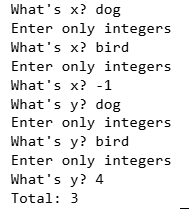
Infinite loops are primarily useful for validating user input as it allows programmers to make sure that the user’s input is correct by prompting them again and again until the user enters the correct input.
In the above code, we are using a try…except block to keep on and on prompting the user, and if a ValueError occurs, the current iteration of the loop will be skipped (the continue keyword allows that) and prompts the user again, and breaks out of the infinite loops only when the user input is correct.
However this brings us to an important thought question; a question which I myself couldn’t answer, and had to ask ChatGPT for the answer.
How come x and y are existing outside the scope of the while loops?
For those unaware, there is a rule in many programming languages that variables only exist within a structure, like a class or a function. If their values are not initialized outside a function, for example, it will result in an error in Python, as that variable which has not been initialized outside the structure, but assigned a value inside a structure can result in an error.
Variables assigned outside a structure are called global variables. Variables assigned within a structure are called local variables.
However, the following are the structures which do not follow the variable scope rule:
for
def
if/else/elif
while
As we are using a while loop in our code, we need not worry about the variable scope rule.
If you want a more detailed explanation with variable scopes, do drop a comment down below requesting for that article (otherwise, I won’t make it, assuming you have understood the concept of variable scoping by reading this short explanation :), so do let me know!)
Time to Make a To-do List Manager!
▶ Before reading the code involved, please read my previous articles on Lists and Dictionaries, and Conditionals for better understanding, as I will not be explaining the code in much detail (I will be only writing short comments on every line of code).
# Print a welcome message
print("Welcome to To-Do List Manager! Create and Delete your Tasks!")

# Initialize a count variable to store the number of tasks entered by the user
# and an empty list to store the user's tasks
count = 0
tasks = []

# Define an infinite loop
while True:
    # Start the try...except... block
    try:
        # Prompt the user for a task
        task = input("Enter your task: ")
        # Increment count
        count += 1
        # Append the user's task in the tasks list
        tasks.append(task)
        # Check if count's value is 4 (meaning whether the user has entered 4
        # tasks
        if count == 4:
            # Ask the user whether they want to delete one of their tasks
            option = input("Do you want to delete a task (yes/no)?")
            # Reset count, so that if the user enters no, the program can skip
            # the current loop iteration and continue prompting the user for a
            # task and later check whether count has reached 4
            count = 0
             # If the user wants to delete a task, then:
            if option == "yes":
                # Ask the user for the task they want to delete
                task = input("Enter the task you want to delete: ")
                # Check whether the user's desired task is in the tasks list
                if task in tasks:
                    # Find the index value of that task and remove it from the list
                    tasks.pop(tasks.index(task))
                    # Skip the current iteration and continue prompting the user
                    # for a task
                    continue
                # If the user's desired task is not in the list, print a message
                # and exit the program
                else:
                    print("Incorrect task, try again.")
                    break
            # If count is not 4, continue prompting the user for a task
            else:
                continue
    # End the program if the user hits Ctrl-C in their keyboard
    except KeyboardInterrupt:
        break
# Print a concluding message to the user
print()
print("See you next time!")


