
Conditionals for Newbies: Guide + Exercises + Challenge

Hello aspiring programmers! I am back with a guide on conditionals, and I hope you enjoyed and found my article on lists and dictionaries helpful, and were able to do the challenge at the end (solution will be discussed in the next article).
If you have any feedback on my articles or have any questions, feel free to drop a comment below and do hit the like icon if you like my work!
So, without further ado, let’s get started!
What are Conditionals?
▶ Conditionals are used to answer questions within code in Python.
▶ Usually, conditionals return Boolean values (True or False). Programmers then decide what code block to execute depending on the return value of the conditional.
Let’s consider a simple analogy:
Jake has a Math exam on Friday. His mother has asked him to study two chapters from his book and tell her when he is finished so that she can give him a test.
But suddenly, Jake started feeling ill, and felt his head hurting. When he told his mother about it, she smiled and said, “Jake, study only if you are feeling normal, else, don’t study at all and rest throughout the day.”
So, got an idea?
To sum up the analogy:
➢ Keywords used in Jake’s mother’s words: if, else (which are actual keywords while writing conditional statements in Python).
➢ Conditionals are used to handle specific scenarios in Python, such as in the analogy, his mother handled the scenario of Jake falling ill and unable to study.
To handle two scenarios (or rather, answer two questions) in Python, we can follow the syntax below:
if question:
  ....
else:
  ....
So basically, for asking two questions, we are using only if and else. Else is usually used to execute a code block when a condition opposite to the condition in the if block is True. For example:
age = 18

if age >= 18:
  print("You are ready to drive a car!")
else:
  print("You are too young!")
Notice that in the code above, if age greater than or equal to 18, the program will print that the user is ready to drive a car, otherwise, it will print that the user is too young. So the else statement is only printed if the condition in the if statement evaluates to False.
Hence, it is important to remember that conditional statements are mostly mutually exclusive, meaning that only one condition can be evaluated to True and thus the code block indented beneath that condition will be executed.
However, the above might not always be the case, for example:
username = input("Enter your username: ")

if " " in username:
  print("Username should not have spaces")
if "&" in username:
  print("Username should have any ampersands")
if len(username) < 5:
  print("Username should be atleast 5 characters long")
else:
  print("Username created successfully!")
Now, at first glance, the code might be confusing to you, because we are using multiple if statements and a single else statement. Take a look at the output below:
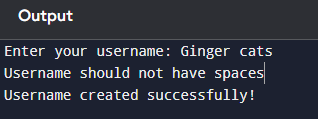
The conditional statements in the code given earlier were not mutually exclusive. This is because the else statement is chained to the third if statement, although many have the confusion that the else statement is applicable to all if statements. In the input Ginger cats, the third if statement (length of username is less than 5?) evaluated to false, so the program not only executed the first if statement (does username have spaces?) but also the else statement (if the third if statement is evaluated to false, the code under the else statement will be executed).
So, to include multiple conditional statements, and make them mutually exclusive, you can make use of the keyword elif.
Elif
▶ elif is a useful keyword in Python that allows us to make multiple conditional statements mutually exclusive, and the ability to ask multiple questions in a program.
elif is short for “else if”. If you have used C before, you would have use if…else if…else to write conditionals. Since Python creators invented Python to bridge the gap between C and Java, they took inspiration from certain syntax in both languages to create Python, so that C and Java programmers need not face any difficulty when transitioning from those low-level languages (languages closer to the computer’s hardware and faster to convert to machine/binary code, but harder to understand the syntax) to a high-level language (languages that have human-readable code but take longer time to convert to binary) like Python.
Let’s improve our code earlier to check username as follows using elif:
username = input("Enter your username: ")

if " " in username:
  print("Username should not have spaces")
elif "&" in username:
  print("Username should have any ampersands")
elif len(username) < 5:
  print("Username should be atleast 5 characters long")
else:
  print("Username created successfully!")
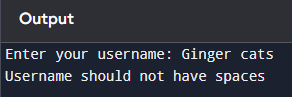
Now compare the new output with the previous output, and you will see that only the code indented under the first if statement is executed, and then no more conditions are being read by the interpreter. So, with the help of elif, we can make multiple conditional statements mutually exclusive and have the else statement chained to all the other conditional statements, meaning if the condition in the if statement or either of the elif statements evaluate to False, the else statement will be executed.
But if you are working on a program that requires multiple questions to be asked, and you want all those questions to be answered and not one at a time, then make use of multiple if statements. Again, it depends on the purpose of the program, and what output you want to achieve (that decision-making will be improved with constant practice).
Guided Exercises
- Write a program to determine whether a number is divisible by 3 and 5, and then print “Fizz Buzz” accordingly.
# Divisible by 3, print Fizz. If divisible by 5, print Buzz

number = int(input("Number: "))

if number % 3 == 0 and number % 5 == 0:
    print("FizzBuzz")
elif number % 3 == 0:
    print("Fizz")
elif number % 5 == 0:
    print("Buzz")
There are two Boolean operators you can can use if you want the same code block to be executed for two conditions:
and
or
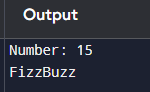
The and keyword is used when both conditions should be evaluated to True or both conditions should be False. In the FizzBuzz code, the first if statement has two conditionals that evaluate to True, so in the output, we see FizzBuzz being printed when 15 is entered.
The or keyword is used when one of the conditions should be evaluated to True. For example:
age = 3

if age == 2 or age == 3:
  print("Toddler")
In the above code snippet, “Toddler” will be printed if age’s values are either 2 or 3.
- Write a program to determine whether a number is odd or even
number = int(input())

if number % 2 == 0:
  print("Even")

else:
  print("Odd")
Since there are only two scenarios in this exercise, we are making use of if…else… In the previous exercise, there were multiple scenarios, so we used the if…elif…else structure.
- Write a program that takes a day as input and prints the position in the week as output.
day = input()

if day == "Monday":
  print(1)
elif day == "Tuesday":
  print(2)
elif day == "Wednesday":
  print(3)
elif day == "Thursday":
  print(4)
elif day == "Friday":
  print(5)
elif day == "Saturday":
  print(6)
else:
  print(7)
Notice that instead of adding another elif statement in the end, we simply used else. else can be used whenever there’s a single question left to answer, in this case, only the question (is the day Sunday?) was remaining to be asked, so we simply used else and wrote the code to be executed if the else condition is True.
CHALLENGE
Write a program that takes the angles of a triangle as input and checks whether it is a valid triangle. (Hint: sum of angles in a triangle is 180 degrees)
See you next time! Don’t forget to try the challenge above!


